Free restaurant reservation software
Every table, every guest, one calm screen.
A fast diary and floor plan for your team, a booking page your guests can use on their phones, and every guest's history in one place. The core is free — with unlimited reservations and covers.
No credit card · Set up in minutes · No sales call
Unlimited reservations and covers
No per-cover fees or commission
No contract, no credit card
On the iPad, your phone or a computer
How it works
Open for bookings tonight
- 1
Set up your restaurant
Your hours, your tables and your rules — sign up and answer a few questions. It takes minutes.
- 2
Open for online bookings
Share your booking link, or paste the booking form into your own website.
- 3
Run service from the diary
Every booking on its table, walk-ins and the waitlist beside it — on the host stand's iPad or any phone.
What's inside
Everything your team needs to run service
These are the real screens, from the demo restaurant — nothing mocked up.
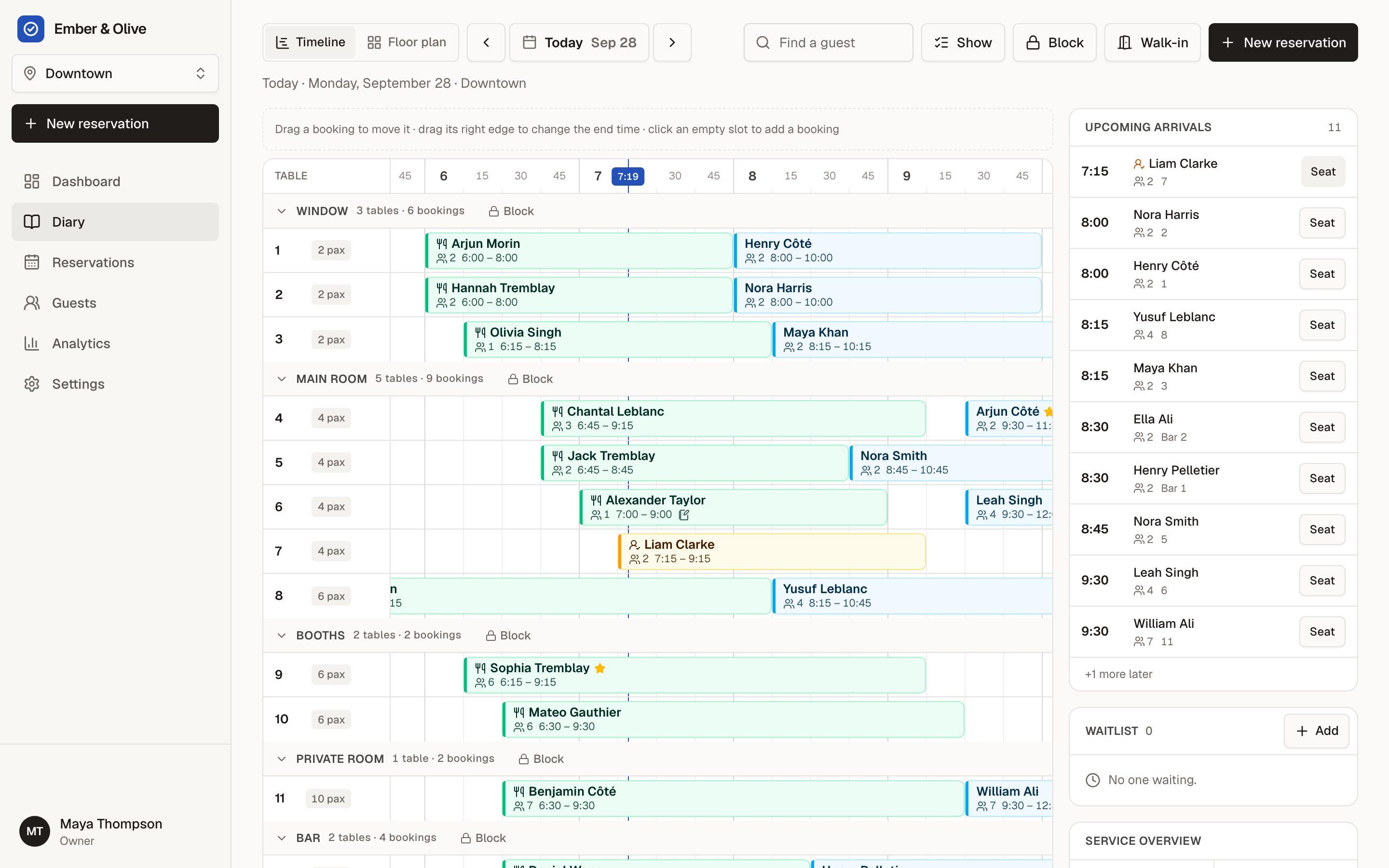
The diary
Your whole service on one calm screen
Every table is a row and every booking a block, so gaps and busy moments are obvious at a glance.
- Drag a booking to another table or time — you see who else would move before you let go.
- Every booking sits on a table, so you can't overbook by accident.
- Seated, arrived and still to come, in colours the whole team learns in a shift.
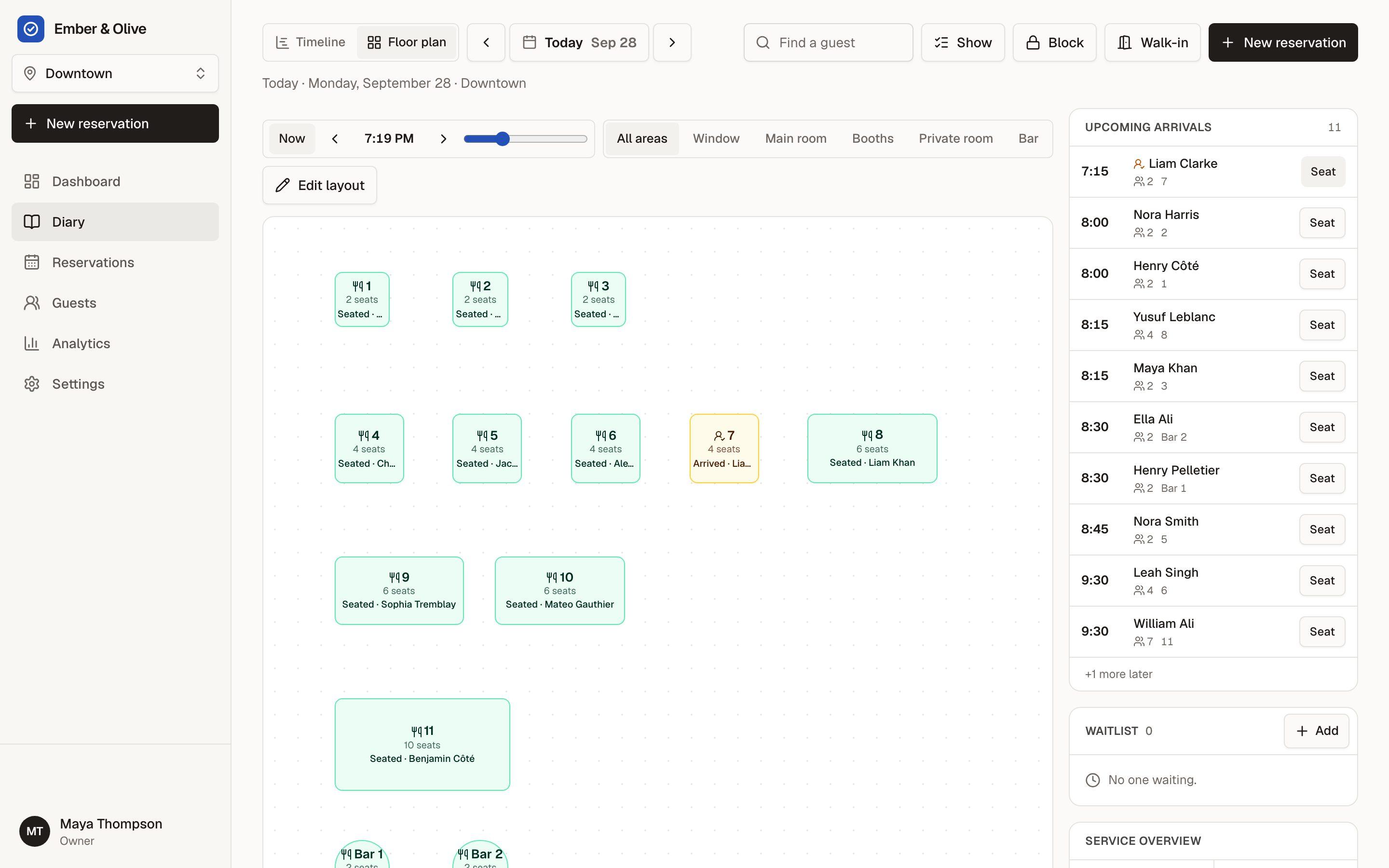
The floor plan
See the room as it is right now
Switch the diary to your floor plan to see who's seated, who has arrived and which tables are free.
- Slide through the evening to see any table at any time.
- Tap a table to seat a walk-in or book it.
- Arrange the plan like your room, or let Hostbook lay it out for you.
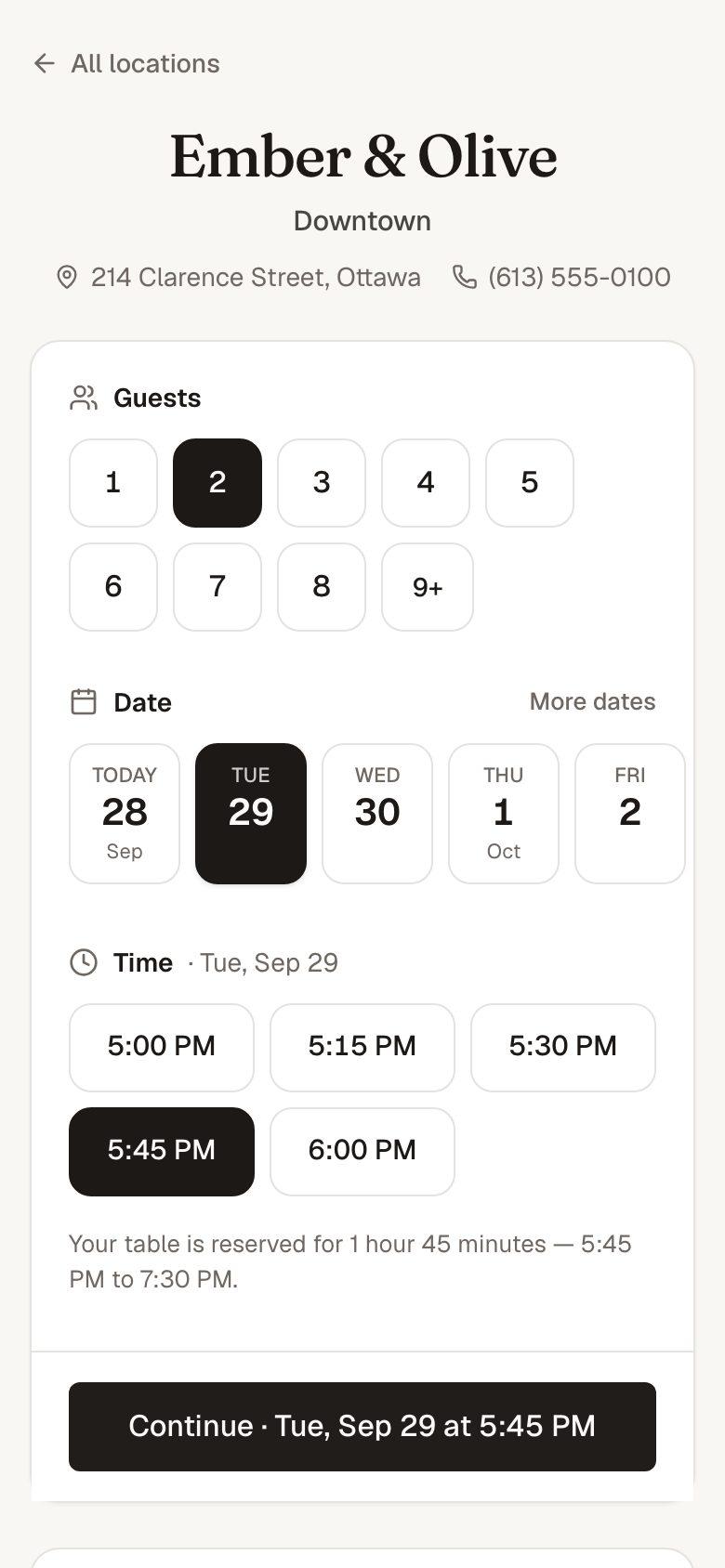
Online bookings
Guests book in seconds, day or night
Your own booking page, made for phones. Guests pick a party size, a day and a time — that's it.
- Only times with a table free for the whole visit are offered.
- Hostbook puts each booking on the right table, joining tables for bigger parties.
- Add the booking form to your own website with one copy and paste.
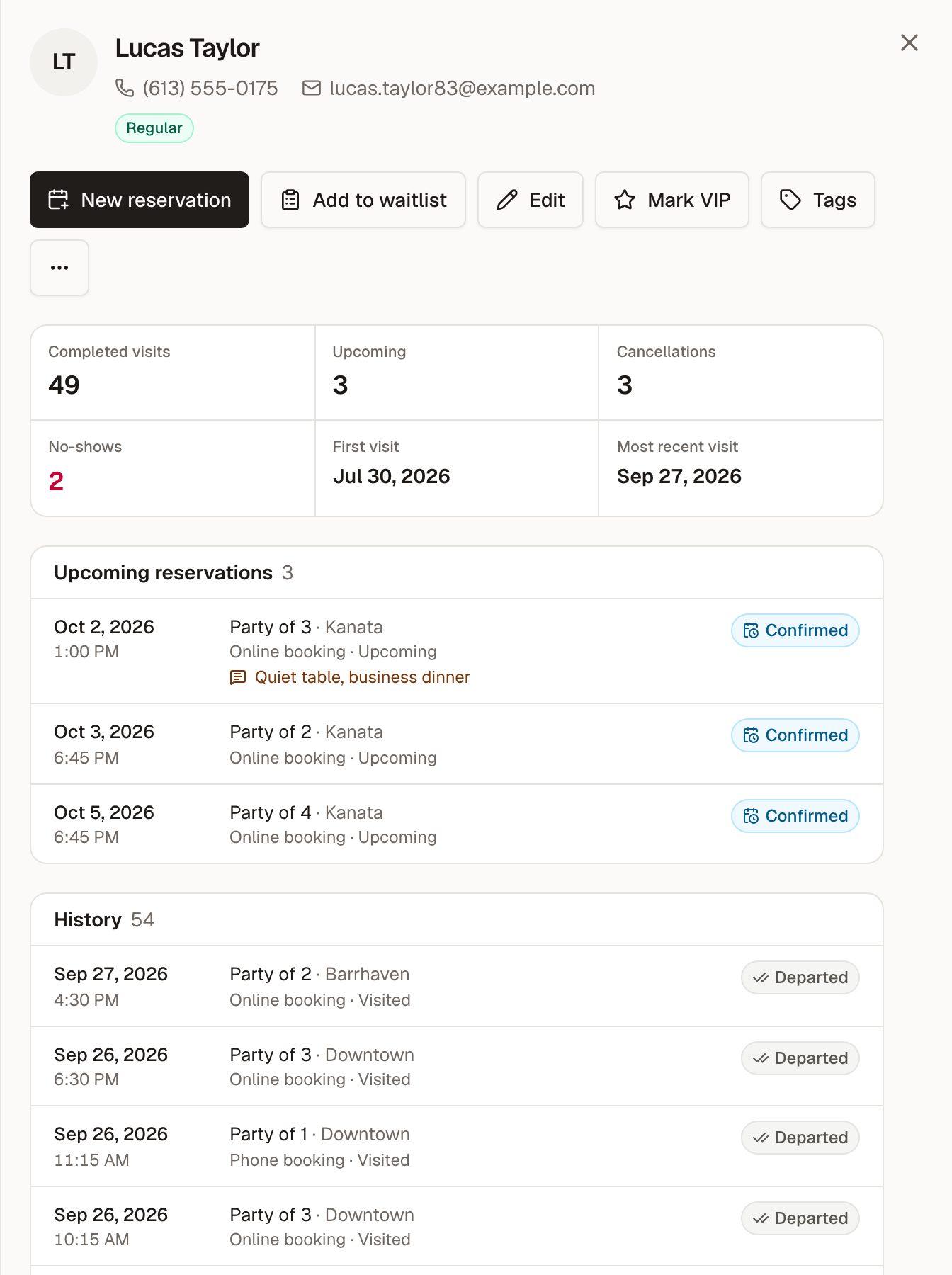
Guests
Know who's coming — and who's coming back
Every guest's visits, preferences and notes in one place, across all your locations.
- Allergies, seating wishes, birthdays and staff notes, ready before they arrive.
- Regulars, VIPs and no-shows spotted at a glance.
- Bring your list from a spreadsheet — people already known aren't doubled up.
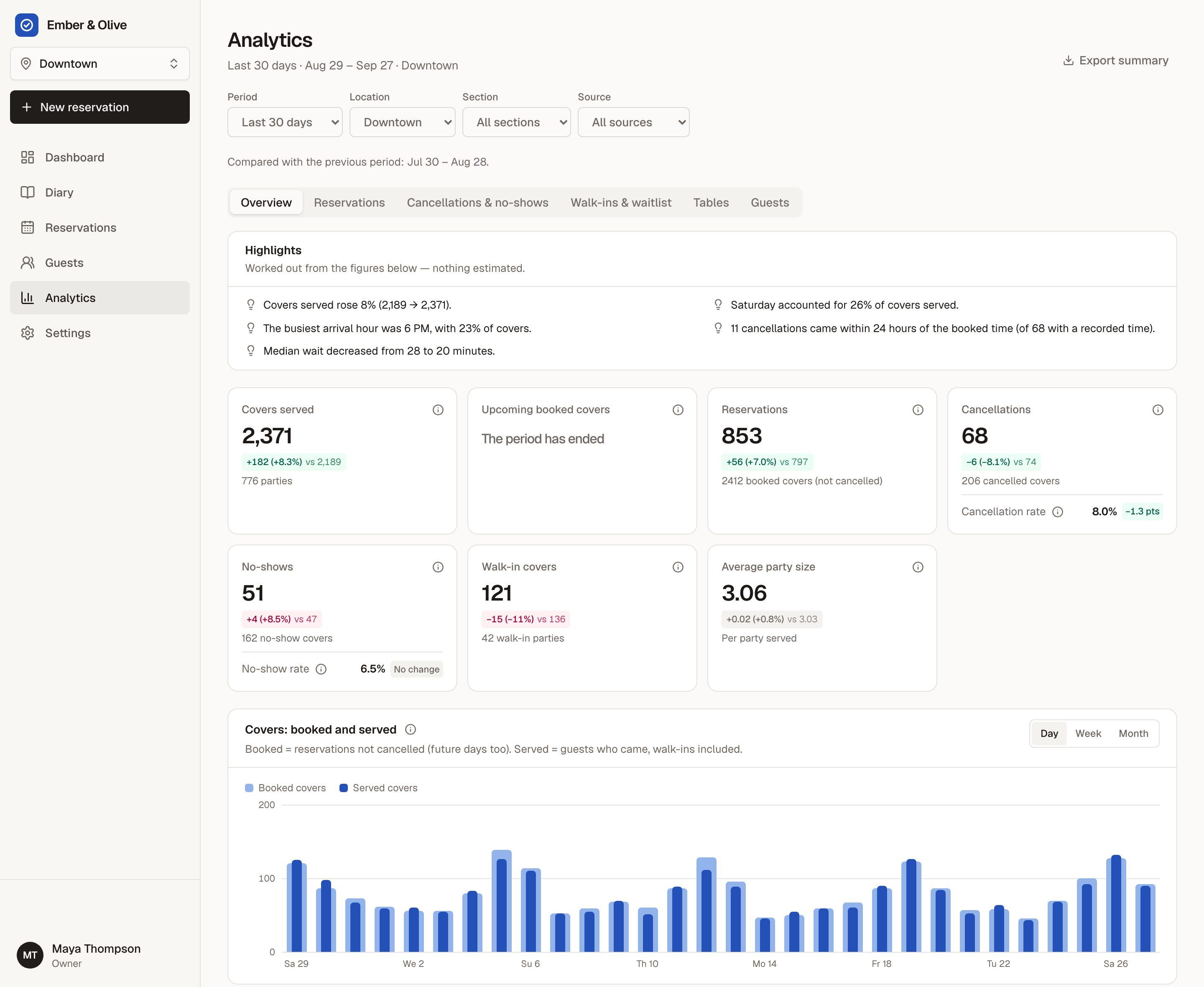
Analytics
See how every service went
Covers, no-shows, cancellations and your busiest days and hours, compared with the period before.
- Every figure explains what it counts — click it to see the bookings behind it.
- Filter by location, section and where bookings came from.
- Export any table as a spreadsheet.
And the rest
Made for how a busy floor really works
Walk-ins and the waitlist
Seat a walk-in in two taps, or add them to the waitlist — with a hint when a table is ready.
Table joins
Say which tables push together and for how many; Hostbook uses them when nothing smaller fits.
Closures and private events
Close the restaurant, a section or a table for a day, a service or every week.
Your seating times
How long a table is held, by party size — a two-top isn't a party of eight.
Your team
Owners, managers and hosts each see what their job needs.
One location or fifty
Add locations whenever you're ready; guests are shared across them.
Pricing
The core is free. For good.
No per-cover fees, no booking limits and no contract. Add-ons are optional — you only ever pay for the extras you choose.
Hostbook core
Everything to run service$0for unlimited reservations and covers
- The diary and floor plan
- Online booking page and website booking form
- Walk-ins and the waitlist
- Guest profiles, notes and guest-list import
- Tables, joins, hours, closures and seating times
- Analytics and spreadsheet exports
- Your whole team and every location
Add-ons
OptionalC$15 a month each, per location, plus tax.No contract. Switch one off whenever you like.
Available now
- Standby listC$15 / monthGuests who couldn't get a time are emailed when a table opens, so cancelled tables refill themselves.
- Group bookings and eventsC$15 / monthBig parties send a request from your booking page instead of calling, and each event has one file for its contacts, menu, billing and the space it takes.
- No-show protectionC$15 / monthGuests secure the bookings you choose with a card. Nothing is charged unless they don't show up or cancel late, and then you decide. Fees are paid straight to your own Stripe account.
Coming soon
- Texts and remindersText message confirmations, reminders, waitlist texts and two-way texting with guests.
- DepositsDeposits paid at booking, for the bookings and events that need them.
- AI chat for your websiteAnswers guests' questions on your website and helps them book.
- Marketing and moreEmail campaigns and review requests, plus more reports and connections to the tools you already use.
Try it yourself — no sign-up
The live demo is the real software with sample restaurants full of bookings. Change anything you like; it resets on its own.
Questions
Good to know
Is Hostbook really free?
Yes. Everything on this page except the add-ons is free — unlimited reservations and covers, no per-cover fees or commission, no contract and no credit card.
What are add-ons, and what do they cost?
Optional extras you add from inside Hostbook: the standby list, group bookings and events, and no-show protection. They cost C$15 a month each, per location, plus tax. There's no contract — switch one off whenever you like, and it runs to the end of the month you've paid for. Text messages, deposits, an AI chat for your website and marketing tools are on the way. The core stays free either way.
Do I need special equipment?
No. Hostbook runs in the web browser — on the iPad at your host stand, on your phone or on any computer.
Can guests book from my own website?
Yes. Share your booking page link, or paste the booking form into your website — Squarespace, Wix, WordPress and most others have an "embed" block for it.
Can a table be double-booked?
Not by accident. Every booking sits on a table, and Hostbook won't put two parties on the same table at the same time. A manager can still do it on purpose.
Can I bring my guest list?
Yes — import it from a spreadsheet (CSV). Guests Hostbook already knows are matched instead of doubled up.
Is it just for one restaurant?
Start with one room and add locations and team members whenever you're ready. Each person sees only the locations they work at.
Your tables, online tonight.
Set up your restaurant in minutes. The core is free — no card, no contract.