Closures, private events and held tables
Close the restaurant, a section or a table — for a day, a service or every week — or keep tables for staff bookings.
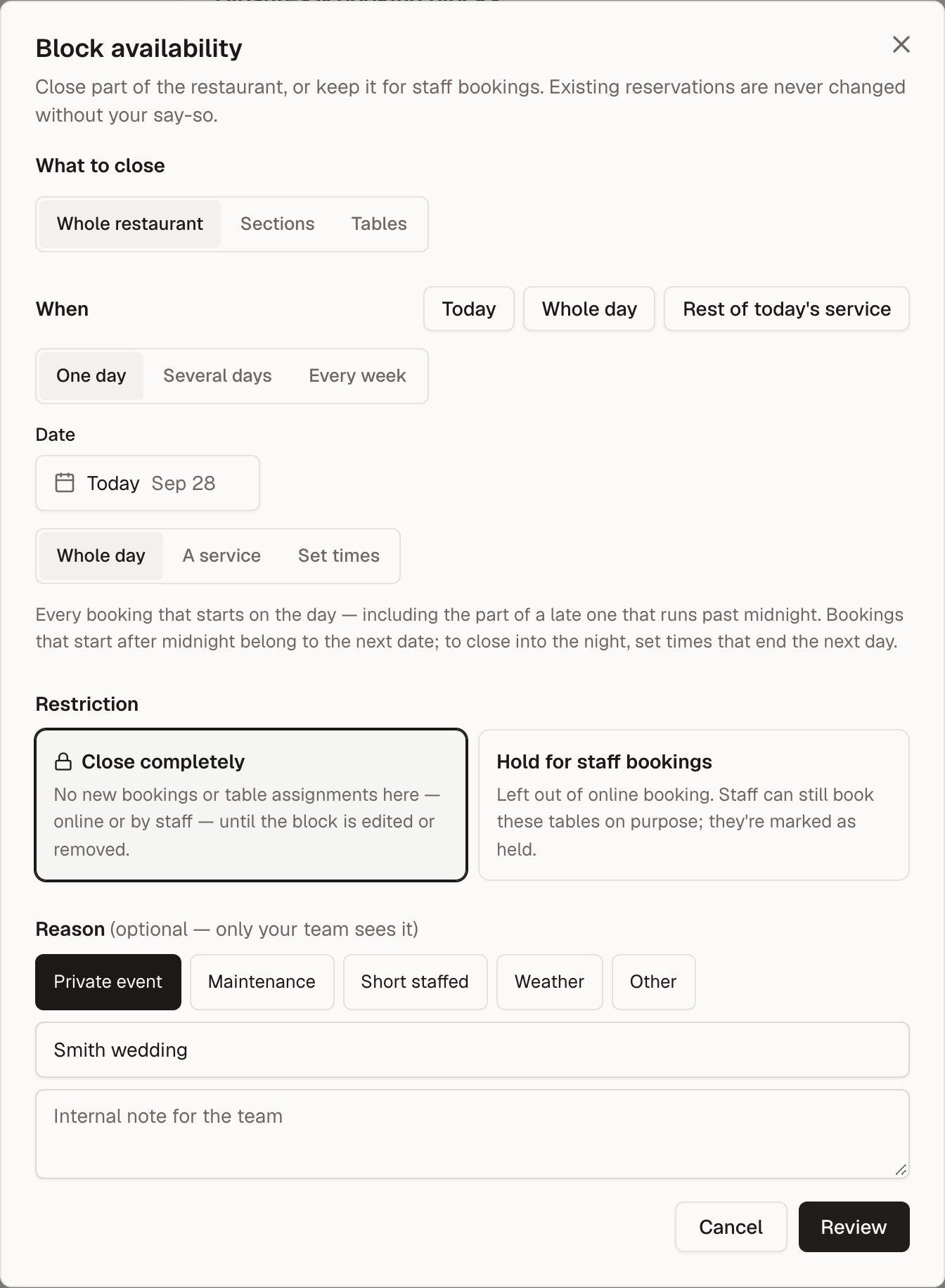
Add a closure
Press Block availability in Settings → Closures & blocks, or the lock button at the top of the diary (hover over it and it says Block availability). On the diary you can also press Block on a section's line, or open a table on the Floor plan and press its lock. Then choose:
- What to close — Whole restaurant, Sections or Tables (then tap the ones to close).
- When — one day, a range of dates, or days of the week that repeat (with or without an end).
- Times — Whole day, A service (such as Dinner) or Set times: choose each time from its list or type it, in 15-minute steps. A closure can run past midnight — it then says ends the next day.
- Restriction — Close completely, or Hold for staff bookings.
- Reason — optional, and only your team sees it: Private event, Maintenance, Short staffed, Weather or Other, plus a label and a note.
Press Review, check what it affects, then save.
Note: Managers and owners can always do this. Hosts can too, from the diary — unless Block tables and add closures is switched off in Settings → Team (What hosts can do). A closure that holds the space for an event is changed from Events, by a manager.
Closed, or held for staff
- Close completely — no new bookings or table changes there, online or by staff, until you edit or remove it.
- Hold for staff bookings — left out of online booking. Staff can still book those tables on purpose; they're marked as held.
Bookings already in that time
A closure never cancels or moves a booking by itself. The review lists every booking it covers and suggests a free table for each. Keep them where they are — they're flagged on the diary — or approve the moves.
Note: Guests never see the reason or the note. On the booking page those times are simply unavailable.
Change or remove a closure
Closures & blocks lists upcoming and past closures. Open one to edit it; for a repeating closure you can change or remove just one date, or the whole series. Removing a closure never changes a reservation.