Your booking page and website booking form
Share your booking link, add booking to your website, and see what guests see.
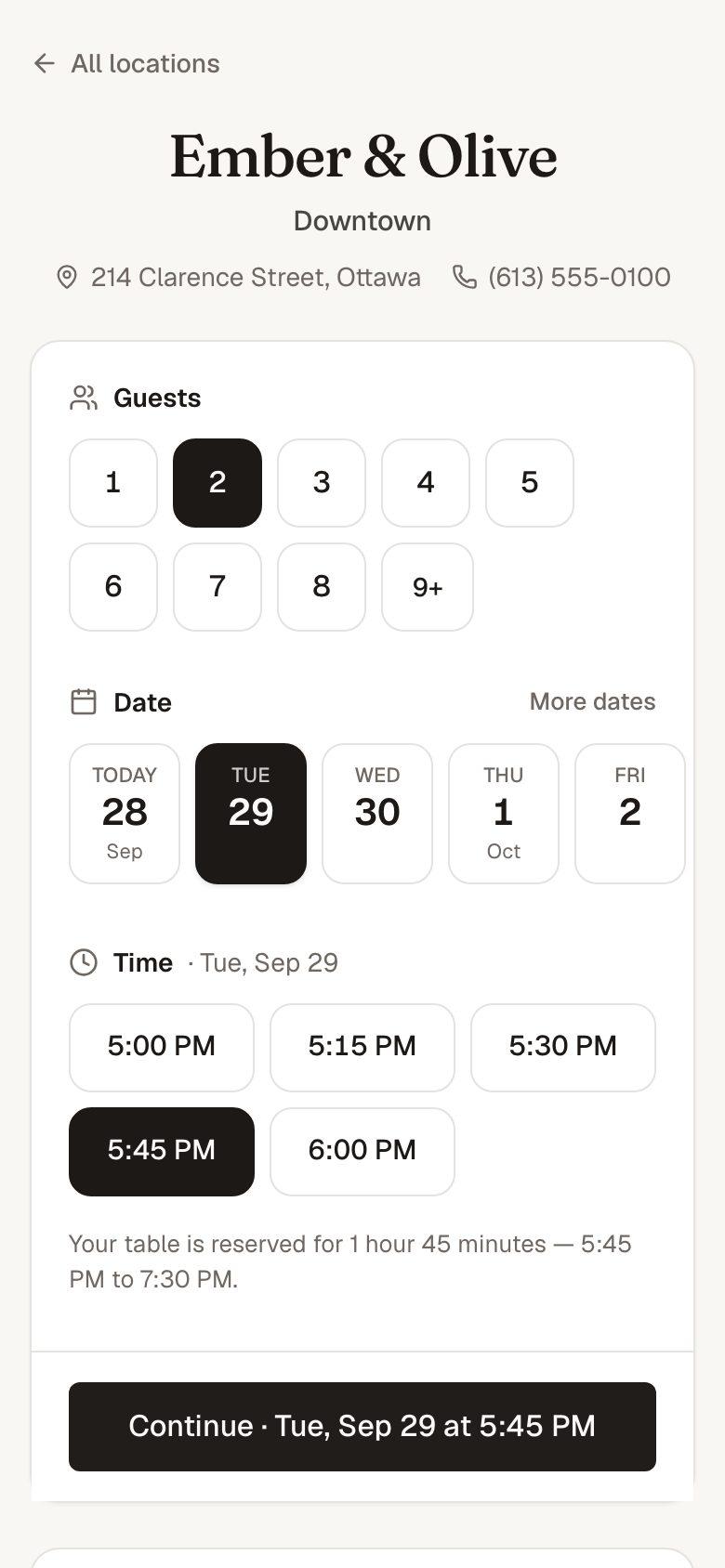
Your booking link
Every restaurant has its own booking page. Find its link in Settings → Booking page and press Copy. Share it anywhere: your website, your Instagram bio, your Google Business Profile or your email signature. To look at it yourself, choose View booking page in the account menu.
Add booking to your website
Settings → Booking page gives you two pieces of code to paste into your website builder (Squarespace, Wix, WordPress…) using an "HTML" or "Embed" block:
- Embedded booking form — guests book without leaving your site.
- “Reserve a table” button — opens your booking page in a new tab.
Press Copy code beside the one you want, then paste it into the block and publish your site.
What guests see
- Step 1: Guests choose how many they are, a day and a time.
- Step 2: They enter their name, mobile number and email, and can add a note ("Celebrating something? Allergies?").
- Step 3: They press Confirm reservation — no payment is needed — and get a confirmation with a code to keep in case they call you, and an email with the details (Emails to guests).
Only times when a table is free for the whole visit are offered, so the restaurant can't be overbooked. Hostbook puts each booking on the right table by itself, joining tables for bigger parties when you've set up table joins. If that needs another booking to move to a different table, it's moved and the diary tells you who moved where.
Note: Guests change or cancel from their email (Change reservation, Cancel reservation) or with Change or cancel on the booking page — see Guests change or cancel online.
With the standby list add-on, a guest who can't get the time they want can also press Join the standby list and is emailed if a table opens.
Guest emails
Hostbook emails guests when a booking is made, changed (date, time or number of guests) or cancelled — from your restaurant's name, with replies going to the email in Settings → Location details. Guest emails in Settings → Booking page shows each email as your guests get it, and managers can switch them off there. More in Emails to guests.
When guests can't book online
- Accept online bookings is switched off in Booking rules — the page asks guests to call instead.
- The restaurant has no tables yet — add them in Tables & areas.
- The day is closed in your hours or by a closure.
- The party is bigger than Largest online party — larger groups are asked to call you (or, with the group bookings and events add-on, to send a request).
- It's too close to the time (Minimum notice) or too far ahead (Book up to).
- No table is free for the whole visit at any time that day. (With the standby list add-on, guests can ask to hear if one opens.)